
An offline inventory app that doesn't quit when the signal does
Carts live in basements, wet markets, and mall corners where mobile data comes and goes. CGRAM is offline-first: crew log inventory, sales, cash, and clock-in selfies with no connection at all, and everything syncs the instant signal returns.
No spinner of death, no lost day, no 'I'll enter it later.'
No card needed · Works offline · Made for Philippine food businesses
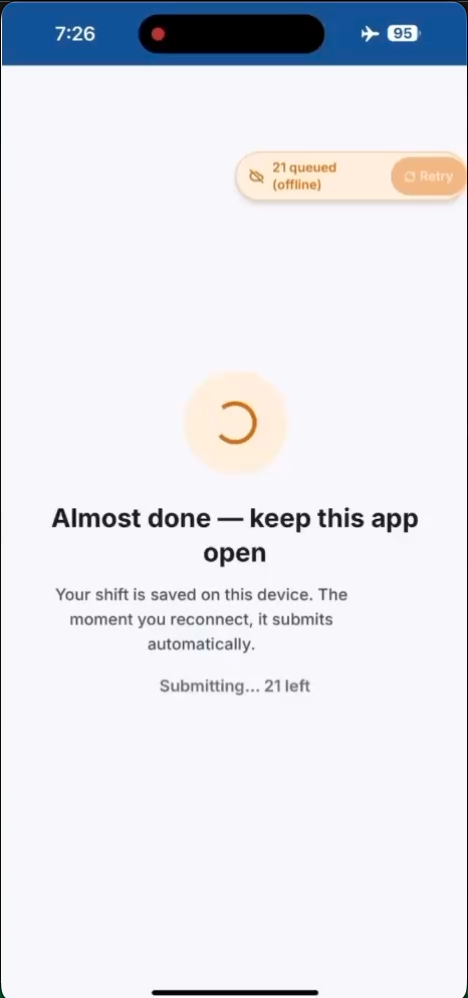
Full day, zero signal
Opening counts, deliveries, pullouts, sales, expenses, and the closing cash count all work offline. A dead spot at the cart never blocks the workflow.
Automatic background sync
Entries queue on the device and upload the moment a connection returns — incrementally, step by step, not as one risky end-of-day dump.
Installs like a real app
CGRAM is a Progressive Web App. Add it to the home screen and it launches full-screen — no app-store download, no update friction.
On-device storage
Data is held safely on the phone via the browser's local database until it's synced, so nothing is lost if you close the app or lose power.
Offline clock-in selfies
The shift-opening selfie is captured and queued even with no signal, so attendance and accountability hold up in any location.
Conflict-safe writes
Each offline entry carries its own identifier, so a retry after a flaky connection can't create duplicates when it finally syncs.
Why offline-first matters for a Philippine kiosk
Connectivity at a food cart is unpredictable — a strong signal at 9am can vanish by the lunch rush. Apps that assume the internet is always there fail exactly when the kiosk is busiest. CGRAM assumes the opposite: every crew action is designed to complete on-device first and sync later.
That means the morning inventory validation, the lunch-hour sales entry, and the evening cash count all happen at full speed regardless of signal. The owner still sees the data — just as soon as the phone reconnects.
Sync that's incremental and safe
CGRAM syncs after each step rather than batching the whole day into one upload at closing. If the connection blinks, only the current step retries — and because each entry is written with its own identifier, a retry is idempotent and can't double-post.
Compress-on-device handling keeps photos small before they upload, so audit selfies and receipt images sync quickly even on a weak connection.
A PWA built for the phone in your pocket
There's nothing to install from an app store. Open CGRAM in the browser, add it to the home screen, and it runs full-screen like a native app — with the service worker keeping the core screens available offline.
Start free for 30 days, no card required. After the trial, a single store runs for ₱99/month and up to three stores for ₱299/month — all with the same offline-first reliability.
Questions, answered
Does CGRAM really work with no internet?
Yes. The full daily flow — inventory, sales, expenses, cash count, and the clock-in selfie — works offline. Entries are stored on the device and sync automatically when a connection returns.
Will I lose data if I close the app while offline?
No. Unsynced entries are held in the browser's on-device database and upload once you're back online, so closing the app or losing power doesn't lose your work.
Do I need to download it from an app store?
No. CGRAM is a Progressive Web App. Open it in your browser and add it to your home screen; it launches full-screen and keeps core screens available offline.
Can offline syncing create duplicate entries?
No. Each offline entry is written with its own identifier, so if a flaky connection causes a retry, the sync is idempotent and won't post the same record twice.
Explore more
Run your kiosk from your phone — starting today
Try CGRAM free for 30 days. No card needed. Or message us for a live 15-minute demo on Messenger.
- Works offline
- Set up in minutes
- Cancel anytime