Built for Philippine SME food businesses

Know if every kiosk closed correctly — without chasing your crew.

CGRAM is the daily close, cash accountability, inventory, and payroll app for Filipino food kiosk owners. Offline-first. Owner-controlled. Honest by design.

30-day free trial — no card required. Paid plans from ₱10/day. Or get free setup help →

Today · 3 stores

₱48,920

All clear
Potato Corner₱18,400
Lemon Up₱16,120
Buko Juan₱14,400
11

guided daily steps, no skipping

3

live Caiva stores running it daily

60-day

photo audit trail, archived

100%

offline-capable — syncs when back

✓ Running daily at 3 Caiva Food Kiosk stores5 crew members — zero tech background neededWeekly payroll + daily audit, done from the phone

Sound familiar?

The daily frustrations CGRAM was built to end.

How it works

One screen at a time. Forward only.

Crew can’t skip steps or see audit results. Owners get a calm, complete picture — and a ping the moment something doesn’t add up.

Open

Clock in & validate

Selfie clock-in, then yesterday's closing inventory is checked. Any discrepancy gates the day until the owner responds.

Run

Sell, spend, deposit

Beginning cash, mid-day deliveries and pullouts, ending count, expenses, per-product + delivery-app sales, GCash deposit.

Close

Audit & submit

Cash accountability reconciles to the drawer. A green/red audit signal — crew never sees peso amounts — then clock out. Edits after close notify the owner.

Built for your whole team

One app, three roles

CGRAM gives each person exactly what they need — and nothing they don’t. Owners run the business, crew run the day, and auditors keep everyone honest.

Owner

Runs the business

  • Set up stores, menus & payroll
  • Monitor every shift in real time
  • Reports, alerts & audit approvals

Crew

Runs the day

  • Guided daily close, no steps skipped
  • Selfie clock-in & cash accountability
  • Works fully offline, syncs later

Auditor

Keeps it honest

  • Independent spot checks
  • Physical inventory & cash counts
  • Crew never see the audit result
See it in action

Real screens, running at real stores

These are actual CGRAM screens from Caiva Food Kiosks — 3 stores, 5 crew members, running daily.

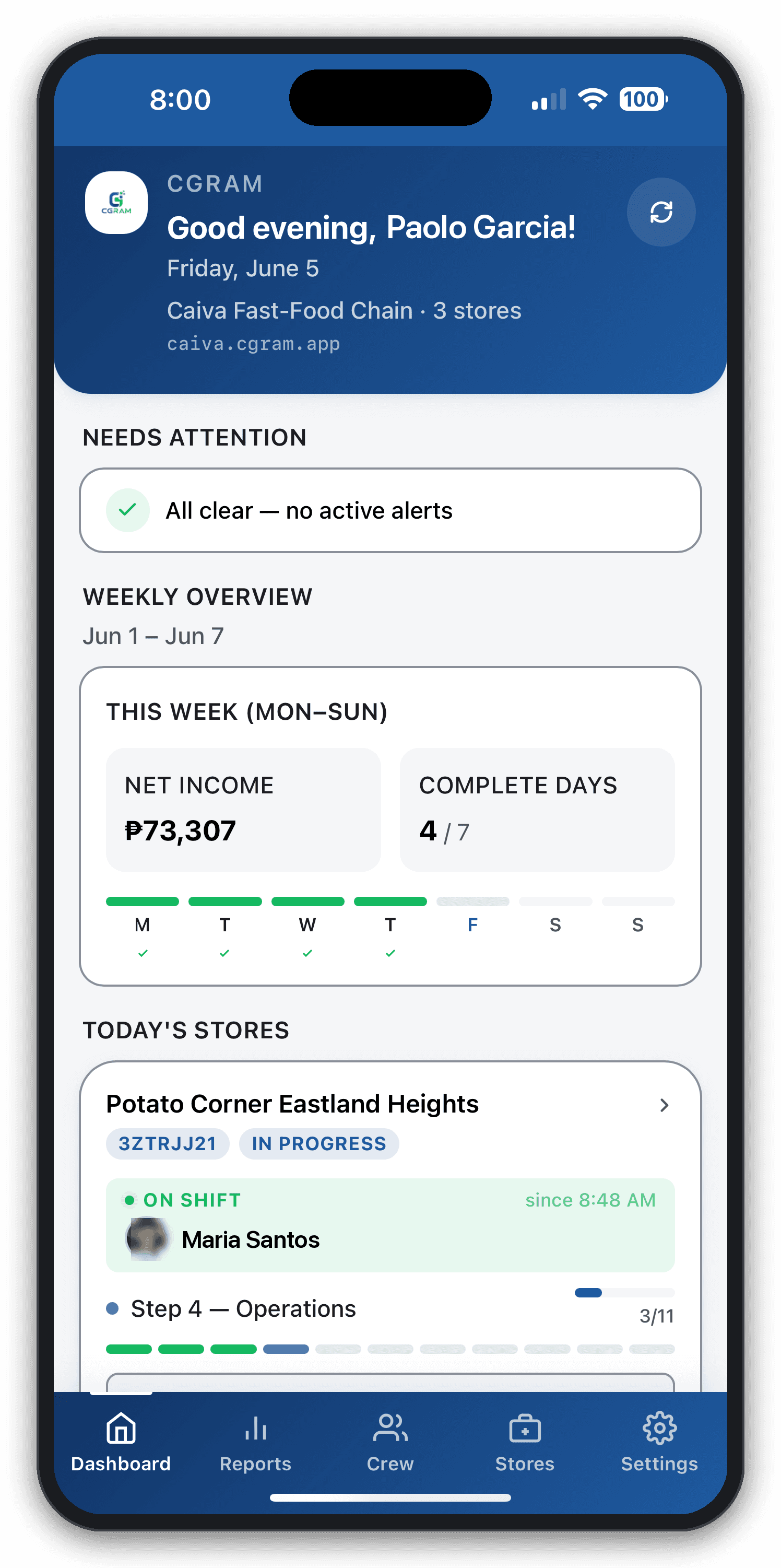
Owner dashboard showing weekly net income of ₱73,307 and all stores in progress
Weekly overview — all stores, one screen
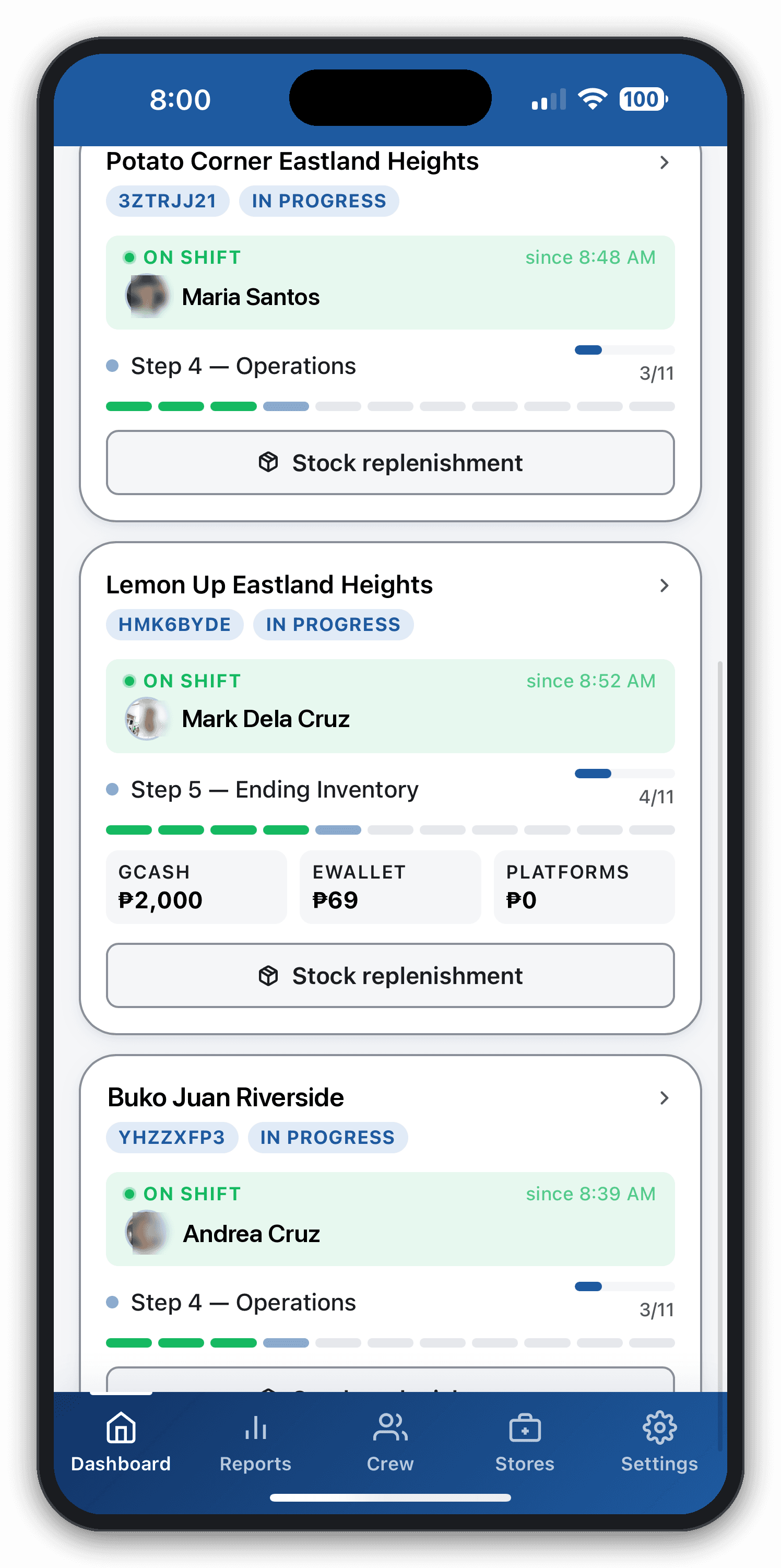
Dashboard showing 3 stores in progress with crew names and steps
Live status: who's on shift, what step they're on
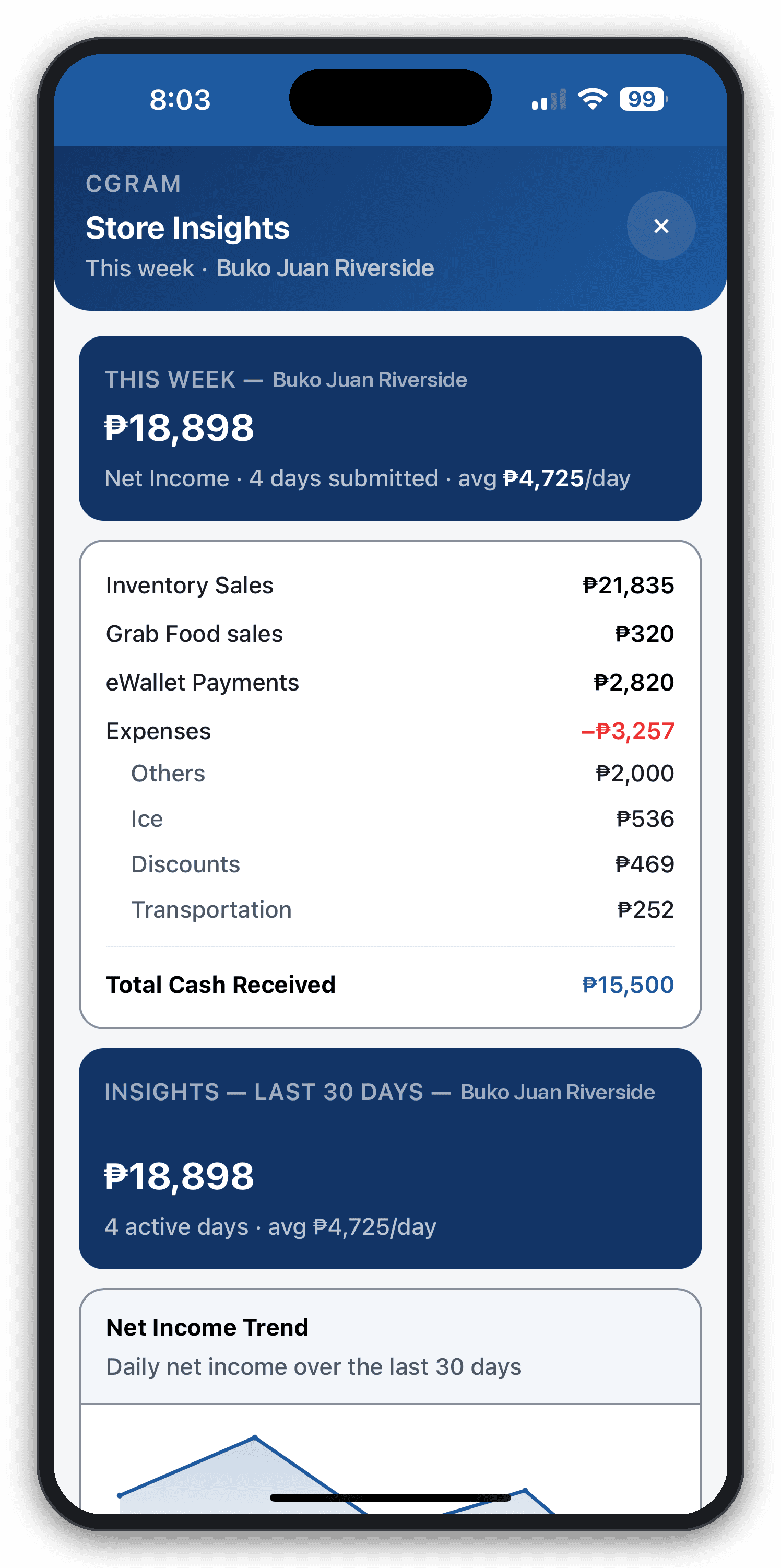
Store insights showing ₱18,898 net income broken down by sales type and expenses
Store insights — net income, expenses, and trends
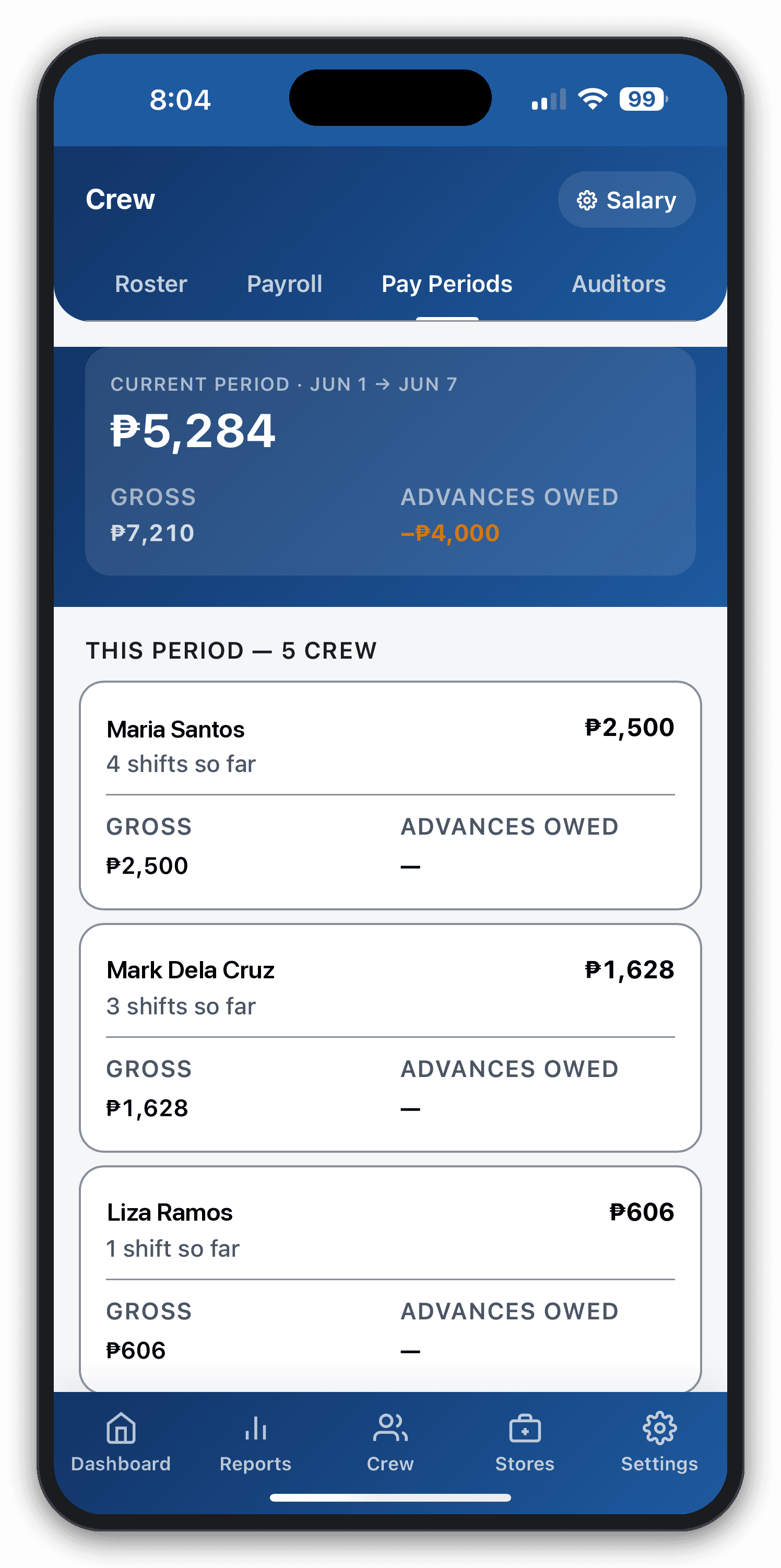
Payroll screen showing ₱5,284 current period total for 5 crew members
Weekly payroll — computed automatically, no spreadsheet
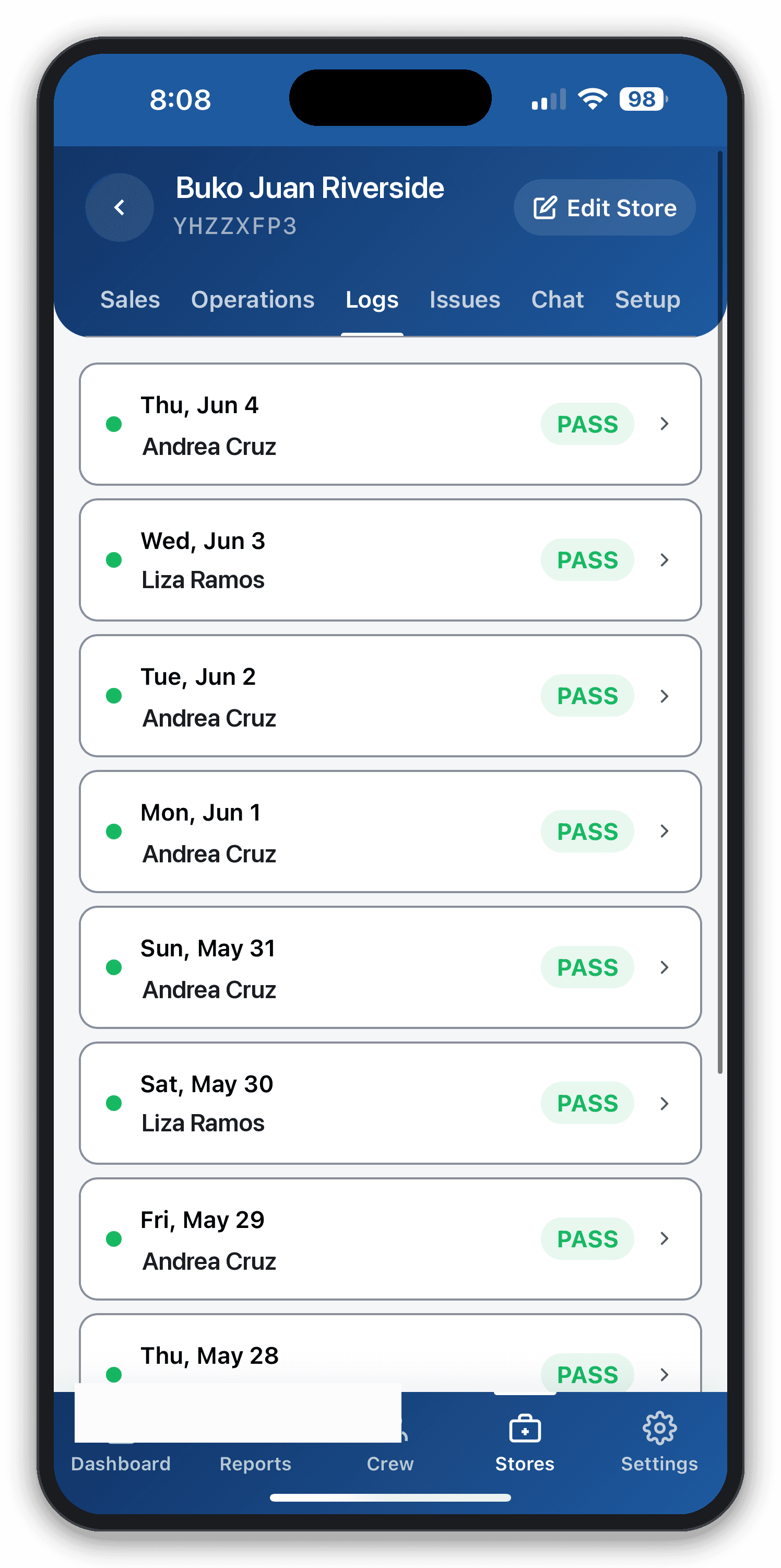
Audit log showing PASS result for every shift
Audit log — every shift result, every day
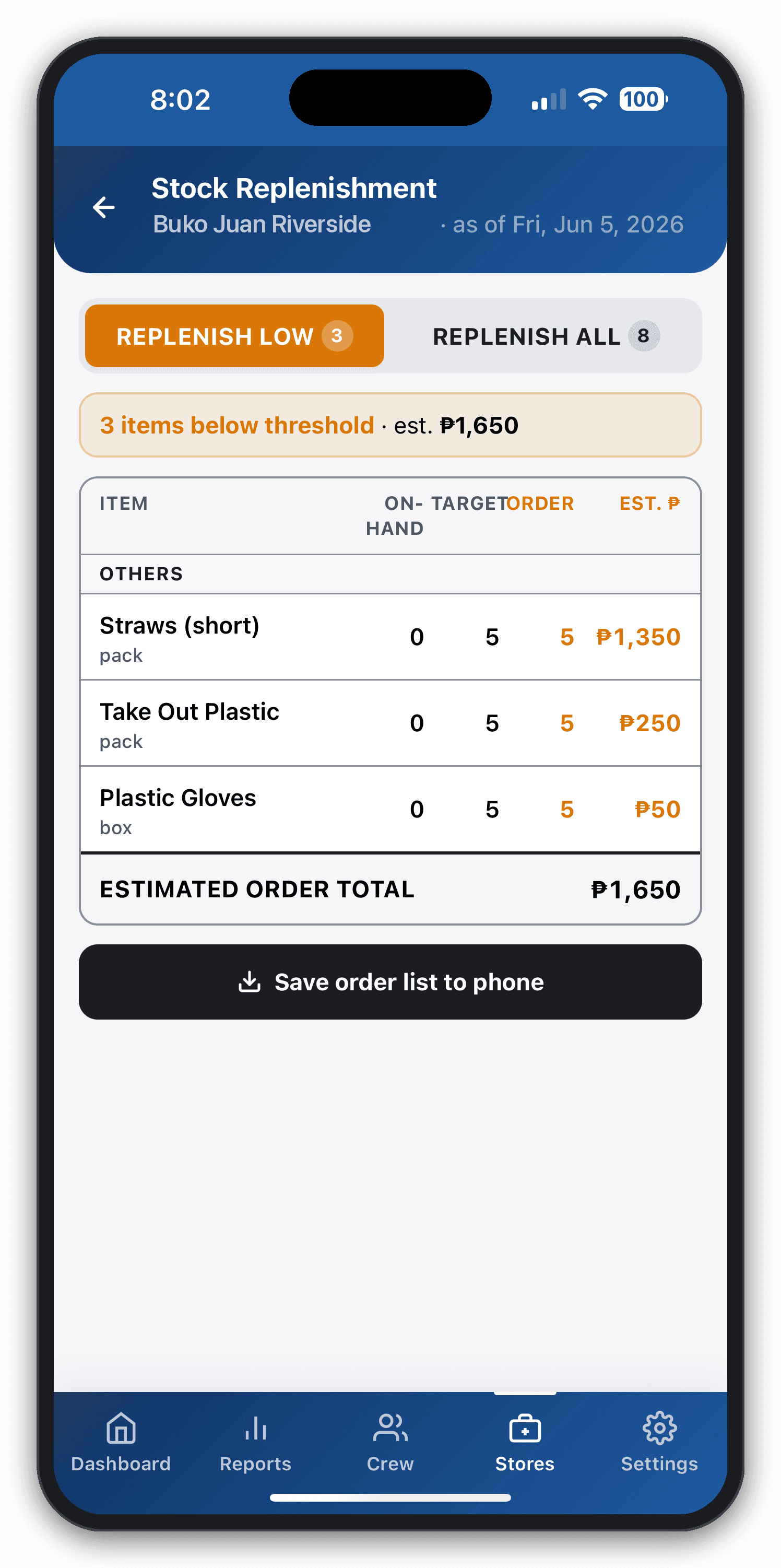
Stock replenishment screen showing 3 items below threshold with an estimated reorder total of ₱1,650
Stock alerts — auto-built reorder list with costs

See CGRAM in action

Real screen recordings from Caiva Food Kiosks — set up a free account, run a crew shift, and keep working with no connection.

Set up a free account in minutes
Built for crew — easy to learn
Works offline, syncs when you're back
Everything in one app

The whole operation, accountable end to end

Cash accountability chain

Beginning cash + in-store sales − expenses − GCash deposited = cash in drawer, carried to the next day. Every peso has a place.

Weekly payroll in minutes, not hours

Fixed daily, base + incentive over target, or hourly from real clock-in/out. What used to take 3 hours every Sunday now takes 10 minutes.

Offline-first

Spotty mall WiFi? Crew keeps working. Each step syncs the moment data returns. Works on any Android phone.

Photo proof

Clock-in selfies and audit shots, compressed on-device and kept on a 60-day rolling archive.

Owner alerts

Inventory flags, cash mismatches, amended entries, and close reminders arrive as push — quietly, only when they matter.

Why CGRAM

Built from the daily grind of running real food kiosks.

CGRAM started as a personal tool for Caiva Food Kiosks — three stores, five crew, and a Sunday night payroll headache. Whether you’re just starting out or already fully registered, CGRAM lets you run daily operations first, then turn on compliance features like BIR receipts, DOLE holiday pay, SSS, and PhilHealth when your business is ready.

  • Compliance features are off by default — no upsells you didn't ask for
  • Your data, compressed and encrypted in transit
  • Designed for crews with no technical background
  • Running at 3 Caiva Food Kiosk stores since 2024
“Hindi ko alam kung tama ang benta, cash, at sweldo unless I manually check everything. Now I can see all three stores from my phone — and payroll is done before I close the drawer.”
RW

Ronald W.

Owner, Caiva Food Kiosks — the team that built this

Your data

Your store data stays yours

Sales, payroll, and crew photos are sensitive. CGRAM keeps them private by default — you decide who sees what, and nothing is ever shared publicly.

Encrypted in transit

Every byte between the kiosk and the server travels over HTTPS — compressed and encrypted on the way.

Owner-controlled access

You set who's an owner, crew, or auditor. Role-based access means each person sees only what their job needs.

Crew never see audit amounts

During a spot check, crew see only a green or red signal — never the expected peso figures behind it.

Photo proof, time-limited

Clock-in selfies and audit shots sit on a 60-day rolling archive, with a monthly copy emailed to the owner.

Exportable — it's yours

Owners can export their store data on the Business plan and take it anywhere. No lock-in, ever.

Never shared publicly

Your sales, payroll, and crew data are never sold, never shared, and never exposed on a public page.

Pricing

Start free. Upgrade when it pays for itself.

30-day free trial — no card needed. After your trial, the Solo plan is ₱99/month (1 store). Upgrade to Starter (₱299/month) when a second store opens — that’s ₱10/day for 3 stores.

Solo

1 store — free for your first 30 days, then ₱99/month.

99/mo
Free for first 30 days — no card needed
Start free — no card needed
  • 1 store
  • Full daily operations flow
  • Crew checklist + cash accountability
  • Single-store dashboard
  • 90-day history
  • Basic daily + Past-30-days reports
  • Advanced store settings
  • Analytics & Store Insights
Most popular

Starter

For owners running up to three stores.

₱299/mo
Less than ₱10/day per store
Choose Starter
  • Everything in Basic
  • Up to 3 stores
  • Salary computation (weekly payroll)
  • Auditor mode + GCash fee tracker
  • Store Insights (per store)
  • Day-of-week heatmap + average ticket
  • Crew productivity + sales-incentive attainment
  • Suggested daily target
  • Pullout tracking + cross-store dashboard
  • 365-day history

Business

For growing multi-store operations.

₱599/mo
Choose Business
  • Everything in Starter
  • Unlimited stores
  • Historical Store Insights (WoW / MoM / YoY)
  • Cash-flow forecasting + forecast-vs-actual
  • Product sales trends + inventory turnover
  • Cross-store benchmarks
  • Custom data exports
  • Priority support
  • 3-year history

Want the full comparison? See detailed pricing →

Need help getting started?

Talk to us first — no pressure.

Some owners prefer to see the app before signing up. Message us on Messenger and we’ll walk you through a live 15-minute demo.

You can also email vision@cgram.app

FAQ

App, install & offline — quick answers

Is CGRAM a native app or a website?

It’s a Progressive Web App (PWA). No App Store or Play Store install needed — open it in Chrome, tap “Add to Home Screen,” and you’re done. It works on both Android and iOS.

Does it work offline?

Yes — all daily steps work offline and sync automatically when WiFi returns.

What phones does it work on?

Any Android phone with Chrome 90+ or an iPhone with Safari 14+.

How do I get it on my phone?

Visit cgram.app from your phone’s browser, tap the share or menu icon, and choose “Add to Home Screen.”

Is there an iOS version?

The same PWA works on iOS — install it from Safari’s Share menu → Add to Home Screen.

Your next shift could run itself.

Set up your first store in minutes — free for 30 days, no card needed. Continue at ₱99/month, or upgrade the day a second store opens.